
Canvas MD Exporter for ChatGPT

One click — save the ChatGPT Canvas, document, or writing block you are currently looking at as a local Markdown .md file. 一鍵把你眼前的 ChatGPT Canvas/文件另存為本機 Markdown 檔。看到哪一篇,就存哪一篇。

Unofficial. Not affiliated with, endorsed, or sponsored by OpenAI.
非官方工具,與 OpenAI 無關。「ChatGPT」為 OpenAI 之商標,僅用於描述相容性。
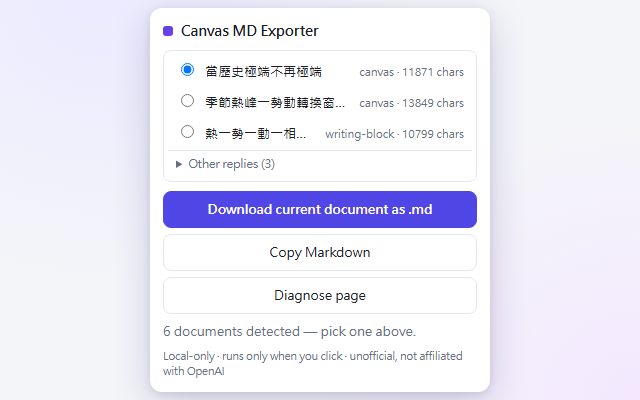
The extension popup listing detected canvas documents with a one-click download button

Why it exists

為什麼需要它

The document already exists

No regeneration. Asking the model to re-output a file costs another message — and regeneration can silently alter wording. This reads what is already on your screen. 不重新生成——重生成會偷改字,也花訊息額度。這個工具只讀你畫面上已經存在的內容。

Math survives

ChatGPT's own copy / export paths often mangle LaTeX. The exporter recovers math from KaTeX annotations and reconstructs Canvas's plain-text math — including several Canvas rendering bugs it repairs on the way out. ChatGPT 自己的複製/匯出常弄壞數學符號;本工具會盡可能修復並保留 LaTeX。

Structure preserved

Headings, nested lists, tables, fenced code with language, blockquotes, links — clean Markdown you can paste into Obsidian, GitHub, or VS Code. 標題、巢狀清單、表格、程式碼區塊、引用——乾淨的 Markdown,直接貼進 Obsidian/GitHub。

Smart candidate picker

Open canvases and document-like replies rank first; short chat replies are tucked away. Multiple documents on screen? Pick from a list. Canvas 與文件級回覆排前面,一般閒聊自動收摺;多份文件可自選。

Privacy by design

隱私是架構,不是承諾

100% local

No servers, no analytics, no accounts, no ads. The extension makes zero network requests — conversion happens entirely in your browser. 全程本機處理,零網路請求。

Runs only when you click

No background activity, no content scripts, no host permissions. It cannot see any page until you invoke it, and it refuses to run outside chatgpt.com. 只在你點擊時執行;沒有背景掃描,離開 chatgpt.com 就拒絕運作。

Never touches secrets

No cookies, no tokens, no history, no hidden conversations. It reads only what you can already see. 不碰 cookie/token/歷史紀錄,只讀你已經看得到的內容。

Install & use

安裝與使用

  1. Install from the Chrome Web Store (link coming — first review in progress), or load the GitHub source unpacked via chrome://extensions. 商店上架審核中;也可從 GitHub 原始碼以開發者模式載入。
  2. Open a ChatGPT Canvas, document, or conversation. 打開 ChatGPT 的 Canvas 或對話。
  3. Click the purple MD icon (or press Alt+Shift+M). 點工具列的紫色 MD 圖示。
  4. Download current document as .md — done. 按下載,完成。

An honest tip

老實說

You may not need this extension. If all you want is convenience, a custom instruction asking ChatGPT to output finished documents as downloadable .md links covers most everyday cases.

This tool is for the rest: saving exactly what is already on screen — without regenerating it, without spending another message, and with math/LaTeX preserved.

We also chose not to build the "more convenient" version — injecting options into ChatGPT's own menus or calling internal APIs. Not because it is hard, but because we respect OpenAI's product as it is. This extension only offers a local way to save the document you can already see.

如果你只是要方便,用自訂提示詞讓 ChatGPT 直接給 .md 下載連結就夠了。這個擴充是為剩下的情境而生:把眼前的內容原樣存下——不重生成、不花額度、數學符號不壞。至於「更方便」的做法(把選項注入 ChatGPT 的選單、呼叫內部 API),不是做不到,是我們選擇不做——我們尊重 OpenAI 的產品互動模式。

Known limits

已知限制(誠實聲明)

  • Only what is rendered. Long conversations are virtualized by ChatGPT; the candidate list follows what you can currently see. 只匯出當前渲染的內容;長對話捲到哪、存到哪。
  • The shown Canvas version only — hidden history versions are out of scope by design. 只匯出目前顯示的版本。
  • Canvas itself damages some $$ math. ChatGPT Canvas's rendering eats certain math opener lines before any extension can see them. The exporter repairs everything that survives and warns when loss is detected; for math-heavy papers, also request a direct .md download from ChatGPT. Canvas 本身會吃掉部分數學開頭行(平台端問題);工具會盡量重組並在偵測到時警告。
  • Heuristic detection. When ChatGPT redesigns its UI, an update may be needed — the popup's Diagnose button exists exactly for that day. ChatGPT 改版時可能需要更新;Diagnose 按鈕就是為那天準備的。